Heim Nachricht GTA 5 & GTA Online: Kurzanleitung zum Sparen

GTA 5 & GTA Online: Kurzanleitung zum Sparen

Autor : Matthew Aktualisieren : Jan 10,2025

GTA 5 und GTA Online: Spielanleitung speichern

Grand Theft Auto 5 und GTA Online verfügen beide über automatische Speicherfunktionen, die den Spielerfortschritt während des Spielens automatisch aufzeichnen. Allerdings kann es schwierig sein zu wissen, wann die letzte automatische Speicherung stattgefunden hat, und Spieler, die vermeiden möchten, dass ihr Fortschritt verloren geht, möchten möglicherweise die Kontrolle übernehmen, indem sie manuell speichern und eine automatische Speicherung erzwingen. Diese Anleitung erklärt, wie das geht, und hilft Spielern, ihre Spiele in Grand Theft Auto 5 und GTA Online zu speichern.

Ein orangefarbener Kreis im Uhrzeigersinn wird in der unteren rechten Ecke des Bildschirms angezeigt, um anzuzeigen, dass die automatische Speicherung ausgeführt wird. Auch wenn der Kreis leicht zu übersehen ist, können Spieler, die ihn sehen, sicher sein, dass ihr Fortschritt automatisch gespeichert wurde.

GTA 5: So speichern Sie Ihr Spiel


Schlafen in einem sicheren Haus

Spieler können ihren Spielfortschritt im Story-Modus von GTA 5 manuell speichern, indem sie in einem sicheren Hausbett schlafen. Um es klar auszudrücken, sichere Häuser sind die Haupt- und Nebenwohnsitze des Protagonisten im Spiel, die auf der Karte mit einem weißen Haussymbol gekennzeichnet sind.

Nach dem Betreten des sicheren Hauses sollten Spieler zum Bett des GTA 5-Protagonisten gehen und eine der folgenden Eingaben drücken, um zu schlafen und das Menü „Spiel speichern“ zu öffnen:

  • Tastatur: E
  • Griff: Pfeiltaste rechts

Verwenden Sie Ihr Mobiltelefon

Spieler, die keine Zeit damit verbringen möchten, zum sicheren Haus zu gehen, können mit ihrem In-Game-Telefon schnell speichern. So geht's:
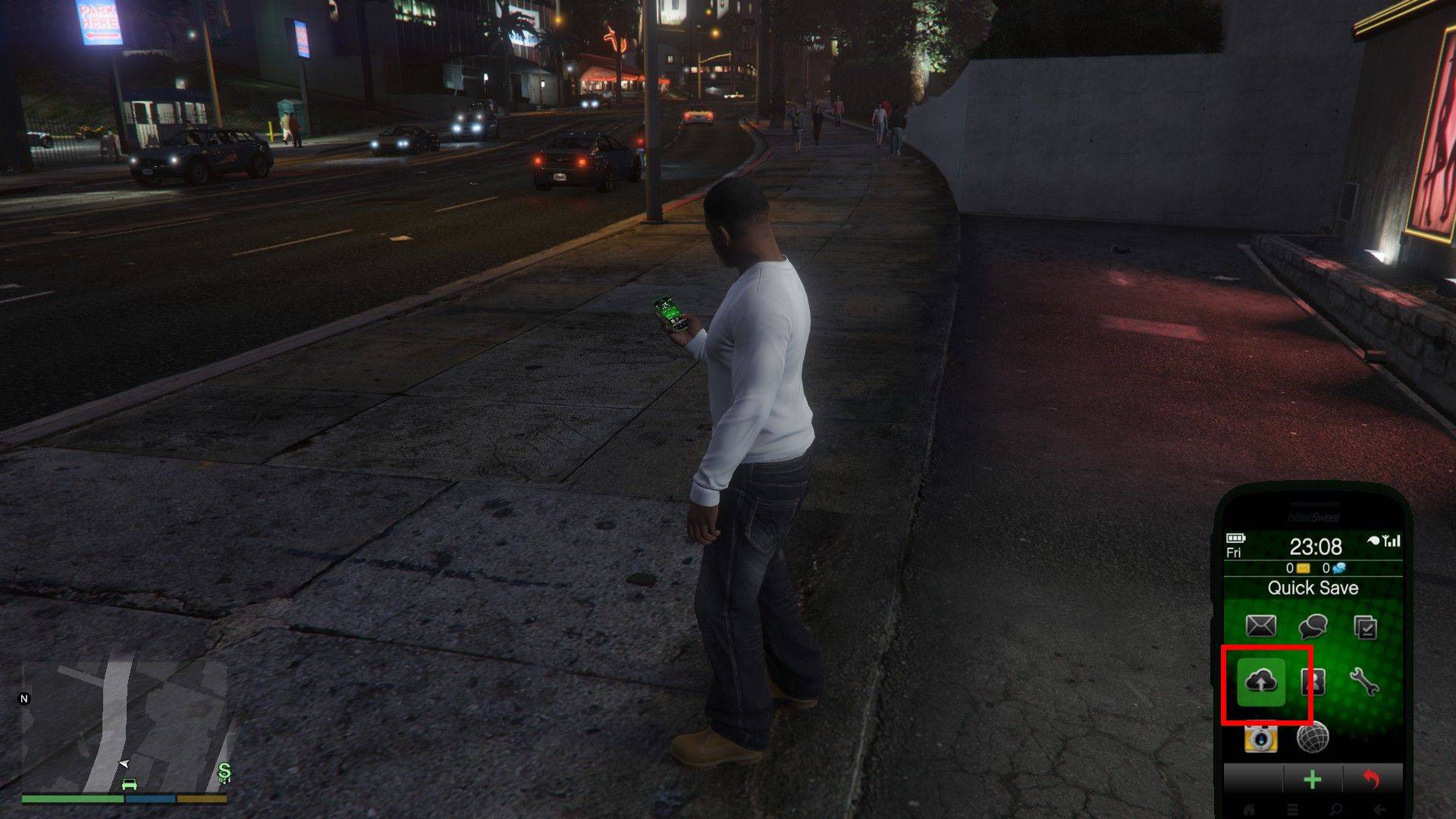
– Drücken Sie die Aufwärtspfeiltaste auf Ihrer Tastatur oder die Aufwärtspfeiltaste auf dem D-Pad Ihres Controllers, um Ihr Telefon zu öffnen.

  • Wählen Sie das Wolkensymbol aus, um das Menü „Spiel speichern“ zu öffnen.
  • Bestätigen Sie zum Speichern.

GTA Online: So speichern Sie Ihr Spiel


Im Gegensatz zum Story-Modus von GTA 5 gibt es in GTA Online kein „Spiel speichern“-Menü, das Spielern das manuelle Speichern ermöglicht. Es gibt jedoch mehrere Möglichkeiten, ein automatisches Speichern zu erzwingen, während Sie online sind, und Spieler, die vermeiden möchten, dass ihr Fortschritt verloren geht, sollten es sich zur Gewohnheit machen, eine der folgenden Strategien anzuwenden.

Kleidung/Accessoires wechseln

GTA Online-Spieler können ein automatisches Speichern erzwingen, indem sie Outfits oder sogar einzelne Accessoires wechseln. Spieler können diese Änderungen vornehmen, indem sie die unten beschriebenen Schritte befolgen und nach Abschluss des Vorgangs nach einem sich drehenden orangefarbenen Kreis in der unteren rechten Ecke des Bildschirms suchen. Wenn kein orangefarbener Kreis vorhanden ist, wiederholt der Spieler diesen Vorgang einfach, bis einer erscheint.

  • Drücken Sie die M-Taste auf der Tastatur oder das Touchpad auf dem Controller, um das interaktive Menü zu öffnen.
  • Wählen Sie einen Auftritt aus.
  • Wählen Sie Zubehör und ändern Sie es. Oder ändern Sie Ihr Outfit.
  • Verlassen Sie das interaktive Menü.

Charaktermenü wechseln

Auch wenn Spieler in GTA Online nicht den Charakter wechseln, können sie eine automatische Speicherung erzwingen, indem sie zum Menü „Charakter wechseln“ navigieren. Spieler können dieses Menü wie folgt aufrufen:
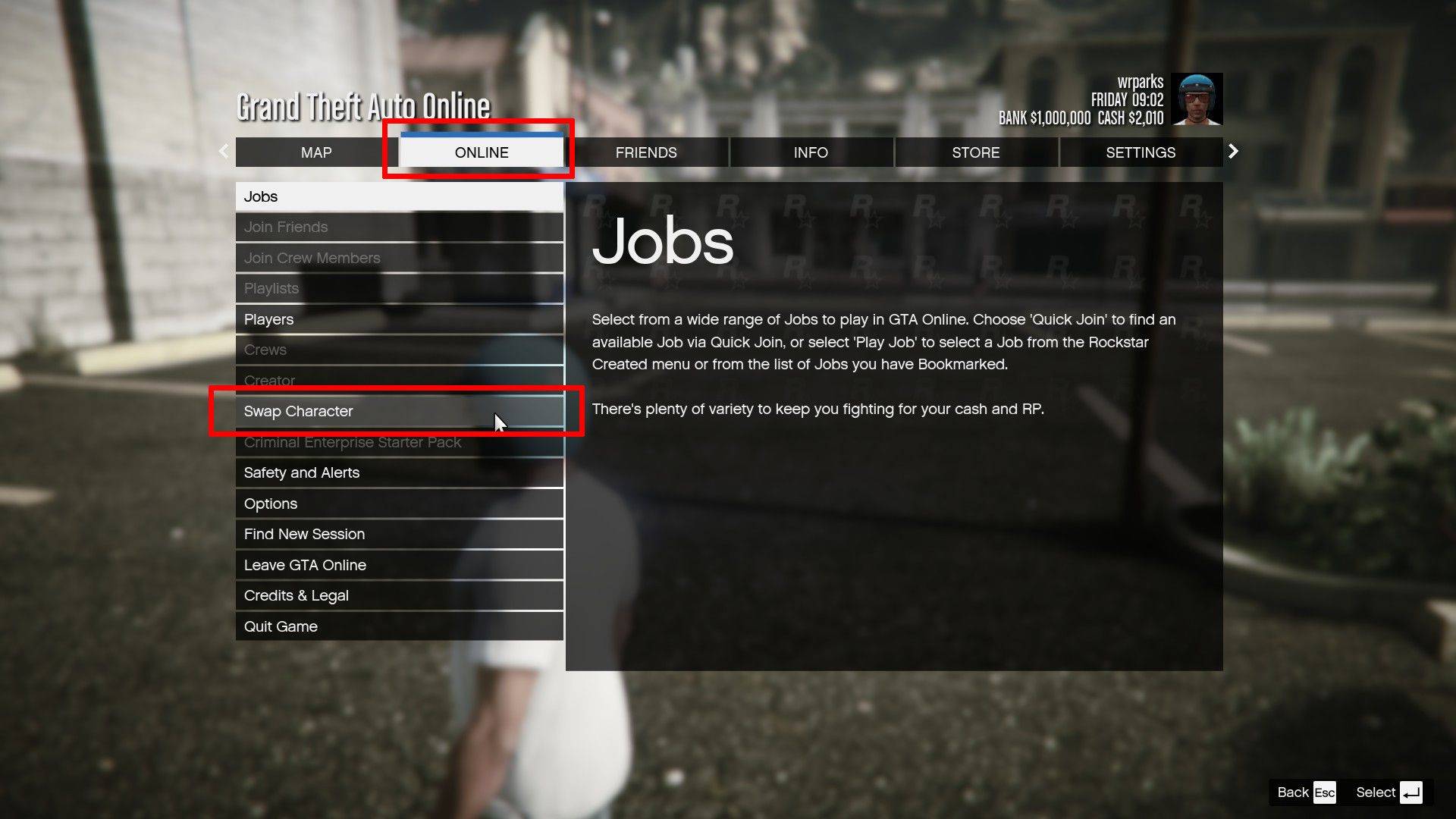
– Drücken Sie die Esc-Taste auf Ihrer Tastatur oder die Start-Taste auf Ihrem Controller, um das Pausenmenü zu öffnen.

  • Navigieren Sie zur Registerkarte „Online“.
  • Wählen Sie „Rolle wechseln“.

Neueste Artikel

Mehr
As of now, there is no official confirmation from Nintendo regarding a game being removed from the Nintendo Switch due to Switch 2 compatibility delays. Reports suggesting such a removal may stem from misinformation, speculation, or confusion surrounding future hardware transitions. Nintendo has not announced any plans to remove existing games from the Nintendo Switch eShop or physical library due to delays in the upcoming Switch 2 (often referred to as the Switch successor or "Switch 2" in media). In fact, Nintendo has consistently emphasized support for its current Switch platform, including continued game releases and online services. That said, it's common for rumors to circulate when new hardware is in development—especially around backward compatibility, game availability, and potential changes to digital storefronts. However, as of the latest updates (early 2024), all major Switch titles remain accessible, and no game has been officially delisted for compatibility reasons. If you’ve seen a specific report about a game being removed, it may be a misunderstanding or a misinterpretation of a different issue—such as a temporary service outage, regional availability changes, or a game being delisted for non-technical reasons (e.g., licensing, publisher decisions). For accurate information, always refer to official Nintendo sources like Nintendo's website or their social media channels. Stay tuned—Nintendo is expected to provide more details about its next-generation console at future events like Nintendo Direct. Lektüre
As of now, August 2025, there are no officially confirmed or publicly released redeem codes for The Tower – Idle Tower Defense that are guaranteed to work. Game developers (including those behind The Tower – Idle Tower Defense) often release temporary redeem codes through official channels like: Twitter/X (@towergameapp) Discord (Official Community Server) Facebook (The Tower Game) In-game events or promotions YouTube creators (trusted partners) ✅ How to Check for Working Codes (August 2025): Visit the official website: https://www.thetowergame.com Join the official Discord: https://discord.gg/towergame – Code drops happen here regularly. Follow on X (Twitter): @towergameapp – They post new codes during events. Check in-game news tab – New codes are sometimes delivered directly in-game. 🔥 Common Code Format (for reference): Codes are typically uppercase letters and numbers, like: WELCOME100 TOWER2025 DISCORDGIVE FREEDROP ⚠️ Note: Always double-check spelling and case. Codes expire quickly and are often limited to 1 use per account. Never enter your account details on third-party websites offering "free codes." 📌 Pro Tip (August 2025): Since The Tower – Idle Tower Defense is regularly updated, new codes appear weekly during seasonal events (e.g., summer festivals, Halloween, New Year). Be sure to: Enable push notifications in the app. Follow the official social media pages. ❌ If a Code Doesn’t Work: It may have expired. It might have reached its redemption limit. It could be region-locked. ✅ Final Advice: As of August 2025, no known active redeem codes are currently circulating publicly. The best way to get new codes is to join the official Discord and follow @towergameapp on X. Would you like me to help you check the latest codes from the official sources (as of mid-August 2025)? Just let me know! 🎮✨ Lektüre
It looks like you're referencing a fun and exciting crossover event between 8 Ball Pool and 8 Ball Pool Crossover, which seems to be a playful or fictional announcement. Let’s break it down and clarify what might be going on — because as of now (June 2024), there is no official crossover event between 8 Ball Pool (the popular mobile game by Miniclip) and any other franchise — especially not "8 Ball Pool Crossover," which sounds like a parody or fan-made concept. Here’s a likely interpretation: 🎯 What’s Actually Happening? "8 Ball Pool Crossover Event Launches" might be a fan-made meme, YouTube video title, or satirical post. It could be a joke referencing how 8 Ball Pool often features characters from other Miniclip games (like Cut the Rope, Stuntman, or Darts) in promotional content or limited-time events. Some users create fake "crossover" hype to mock or celebrate the game’s quirky, cartoonish style — especially when it features characters from totally unrelated games. Why the Confusion? Miniclip (the developer of 8 Ball Pool) has done crossover-style events in the past — for example: 8 Ball Pool teaming up with Minecraft, The Sims, or FIFA in promotional campaigns. Players have seen 8 Ball Pool avatars appear in other Miniclip games, and vice versa. These are not full crossovers, but they give fans the illusion of one. Possible Real Event? As of now, no official "8 Ball Pool Crossover Event" has been announced by Miniclip. If you saw this on social media, it's likely: A meme (e.g., "8 Ball Pool x Spider-Man Crossover: Chaos Ensues"). A fan-made video titled for clickbait. A spoof of how gaming crossovers are overhyped. ✅ TL;DR: 🤯 There is no real "8 Ball Pool Crossover Event" with another game as of now. The phrase is likely a joke, fan creation, or internet meme. 8 Ball Pool does have fun promotional events — but not full crossovers like in Fortnite or Genshin Impact. Stay tuned to official Miniclip or 8 Ball Pool social channels for real updates! If you saw this on TikTok, YouTube, or Twitter — it's probably meant to be humorous. 😄 Let me know if you want help finding real 8 Ball Pool events or creating your own fake crossover story! Lektüre