Heim Nachricht Ever Legion – Alle gültigen Einlösecodes für Januar 2025

Ever Legion – Alle gültigen Einlösecodes für Januar 2025

Autor : Nathan Aktualisieren : Jan 23,2025

Ever Legion: Ein Leitfaden zum Einlösen von Codes und zur Steigerung Ihres Gameplays

Ever Legion, ein fesselndes Idle-Rollenspiel, das in einer atemberaubenden 3D-Fantasiewelt spielt, bietet eine spannende Mischung aus Strategie und Abenteuer. Um Ihren Fortschritt zu beschleunigen und zusätzliche Ressourcen freizuschalten, veröffentlichen die Entwickler regelmäßig Einlösecodes. Dieser Leitfaden bietet eine umfassende Liste aktiver Codes und einen schrittweisen Einlösungsprozess.

Aktive Einlösecodes

Ever Legion-Einlösecodes bieten kostenlose In-Game-Ressourcen und exklusive Gegenstände, die Ihren Fortschritt erheblich erleichtern, insbesondere für neue Spieler (Link zum Anfängerleitfaden). Diese über offizielle Kanäle verteilten Codes bieten verschiedene Belohnungen, um Ihre Reise zu bereichern.

  • Happycbv2024:500 Diamanten
  • ELdiscord: 2x Beschwörungsschriftrollen

Wichtiger Hinweis: Bei Codes muss die Groß-/Kleinschreibung beachtet werden. Lösen Sie sie umgehend ein, da viele ein Ablaufdatum oder eine begrenzte Verwendung haben. Durch die regelmäßige Suche nach aktualisierten Codelisten stellen Sie sicher, dass Sie Ihre Belohnungen maximieren und Ihre Helden stärken.

So lösen Sie Codes ein

Das Einlösen von Codes in Ever Legion ist einfach. Befolgen Sie diese Anweisungen:

  1. Anmelden:Greifen Sie auf Ihr Ever Legion-Konto zu.
  2. Navigieren Sie zu den Einstellungen: Klicken Sie auf Ihren Avatar (obere linke Ecke) und wählen Sie „Einstellungen“.
  3. Einlösecode finden: Suchen Sie die Option „Code einlösen“ und wählen Sie sie aus.
  4. Code eingeben: Geben Sie den Code sorgfältig ein, achten Sie auf Genauigkeit und vermeiden Sie zusätzliche Leerzeichen.
  5. Bestätigen: Klicken Sie zum Absenden auf „Bestätigen“. Prämien werden Ihrem Konto automatisch hinzugefügt.
  6. Inventar prüfen: Überprüfen Sie Ihre Prämien in Ihrem Inventar. Wenn es Probleme gibt, überprüfen Sie den Code noch einmal auf Fehler und stellen Sie sicher, dass er noch gültig ist.
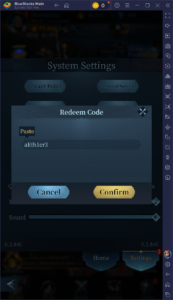
Ever Legion - Code Redemption Interface

Behebung von Problemen bei der Code-Einlösung

Wenn ein Code nicht funktioniert, ziehen Sie folgende Möglichkeiten in Betracht:

  • Tippfehler:Stellen Sie sicher, dass der Code präzise eingegeben wird und beachten Sie dabei die Groß-/Kleinschreibung.
  • Ablauf:Überprüfen Sie die Gültigkeit des Codes; Abgelaufene Codes sind unbrauchbar.
  • Regionale Einschränkungen: Einige Codes sind möglicherweise regionalspezifisch oder auf eine Verwendung pro Konto beschränkt.
  • Spielaktualisierungen:Starten Sie das Spiel neu oder suchen Sie nach Updates für Ihren Spielclient.

Verbessern Sie Ihr Ever Legion-Erlebnis, indem Sie diese Codes regelmäßig einlösen. Für optimale Leistung und Grafik spiele Ever Legion auf dem PC mit BlueStacks. Viel Spaß beim Spielen!

Neueste Artikel

Mehr
It seems you're referring to a mobile game called Figment Puzzle Game, possibly looking for information about it being free on the Epic Games Store. However, as of now, there is no widely known puzzle game titled Figment Puzzle Game available on the Epic Games Store for mobile. Here are a few clarifications: Epic Games Store Mobile Availability: The Epic Games Store is primarily available on desktop (Windows), and while it does have a mobile app for Android, it does not currently offer a large library of mobile-exclusive games like Figment Puzzle Game. Most games on the Epic Store are PC-focused. Figment – The name "Figment" may be referencing Figment, a whimsical character from Disney's Dreams (a multimedia project), or a game inspired by that character. There have been indie puzzle games with similar themes, but no major title named Figment Puzzle Game is officially listed on Epic Games Store. Free on Epic Games: If a game is free on the Epic Games Store, it’s usually highlighted as such. You can check the store directly at https://www.epicgames.com to search for "Figment" or related puzzle games. 🔍 What You Can Do: Search the Epic Games Store app (on Android or desktop) for "Figment Puzzle Game". Check if it’s a third-party indie game on platforms like Itch.io or Google Play. Confirm the game’s official name—sometimes titles are slightly different. If you meant a different game (e.g., Puzzle Quest, Monument Valley, or The Talos Principle), let me know and I can help find a free alternative on the Epic Store or other platforms. Let me know more details if you’d like help! Lektüre
As of now, there is no official confirmation from Nintendo regarding a game being removed from the Nintendo Switch due to Switch 2 compatibility delays. Reports suggesting such a removal may stem from misinformation, speculation, or confusion surrounding future hardware transitions. Nintendo has not announced any plans to remove existing games from the Nintendo Switch eShop or physical library due to delays in the upcoming Switch 2 (often referred to as the Switch successor or "Switch 2" in media). In fact, Nintendo has consistently emphasized support for its current Switch platform, including continued game releases and online services. That said, it's common for rumors to circulate when new hardware is in development—especially around backward compatibility, game availability, and potential changes to digital storefronts. However, as of the latest updates (early 2024), all major Switch titles remain accessible, and no game has been officially delisted for compatibility reasons. If you’ve seen a specific report about a game being removed, it may be a misunderstanding or a misinterpretation of a different issue—such as a temporary service outage, regional availability changes, or a game being delisted for non-technical reasons (e.g., licensing, publisher decisions). For accurate information, always refer to official Nintendo sources like Nintendo's website or their social media channels. Stay tuned—Nintendo is expected to provide more details about its next-generation console at future events like Nintendo Direct. Lektüre
As of now, August 2025, there are no officially confirmed or publicly released redeem codes for The Tower – Idle Tower Defense that are guaranteed to work. Game developers (including those behind The Tower – Idle Tower Defense) often release temporary redeem codes through official channels like: Twitter/X (@towergameapp) Discord (Official Community Server) Facebook (The Tower Game) In-game events or promotions YouTube creators (trusted partners) ✅ How to Check for Working Codes (August 2025): Visit the official website: https://www.thetowergame.com Join the official Discord: https://discord.gg/towergame – Code drops happen here regularly. Follow on X (Twitter): @towergameapp – They post new codes during events. Check in-game news tab – New codes are sometimes delivered directly in-game. 🔥 Common Code Format (for reference): Codes are typically uppercase letters and numbers, like: WELCOME100 TOWER2025 DISCORDGIVE FREEDROP ⚠️ Note: Always double-check spelling and case. Codes expire quickly and are often limited to 1 use per account. Never enter your account details on third-party websites offering "free codes." 📌 Pro Tip (August 2025): Since The Tower – Idle Tower Defense is regularly updated, new codes appear weekly during seasonal events (e.g., summer festivals, Halloween, New Year). Be sure to: Enable push notifications in the app. Follow the official social media pages. ❌ If a Code Doesn’t Work: It may have expired. It might have reached its redemption limit. It could be region-locked. ✅ Final Advice: As of August 2025, no known active redeem codes are currently circulating publicly. The best way to get new codes is to join the official Discord and follow @towergameapp on X. Would you like me to help you check the latest codes from the official sources (as of mid-August 2025)? Just let me know! 🎮✨ Lektüre