Maison Nouvelles Marvel Rivals : accélération de la souris désactivée pour un jeu amélioré

Marvel Rivals : accélération de la souris désactivée pour un jeu amélioré

Auteur : Noah Mise à jour : Jan 02,2025

L'accélération de la souris est préjudiciable aux tireurs compétitifs, et Marvel Rivals ne fait pas exception. Le jeu permet malheureusement l'accélération de la souris par défaut, sans bascule dans le jeu. Ce guide explique comment le désactiver.

Désactivation de l'accélération de la souris dans Marvel Rivals

Les paramètres du jeu n'offrant pas d'option d'accélération de la souris, vous devez modifier un fichier de configuration. Voici comment :

  1. Appuyez sur la touche Windows R, puis tapez %localappdata% et appuyez sur Entrée.

  2. Localisez le dossier Marvel, puis accédez à MarvelSavedConfigWindows.

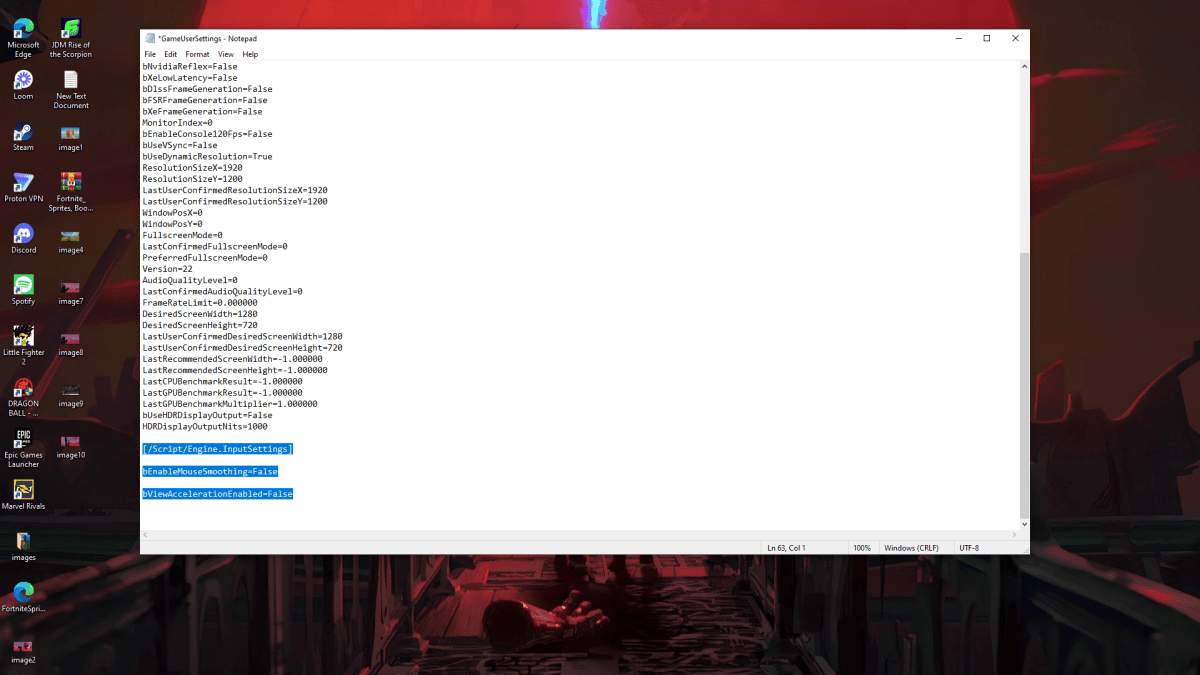
  3. Ouvrez GameUserSettings.ini à l'aide du Bloc-notes (ou d'un éditeur de texte similaire).

  4. Ajoutez les lignes suivantes à la fin du fichier :

    [/Script/Engine.InputSettings]
    bEnableMouseSmoothing=False
    bViewAccelerationEnabled=False
  5. Enregistrez les modifications (Ctrl S), puis fermez le fichier.

  6. Cliquez avec le bouton droit GameUserSettings.ini, sélectionnez « Propriétés », cochez « Lecture seule » et cliquez sur « Appliquer ».

Cela désactive l'accélération de la souris dans Marvel Rivals. Pour des résultats optimaux, désactivez-le également sous Windows :

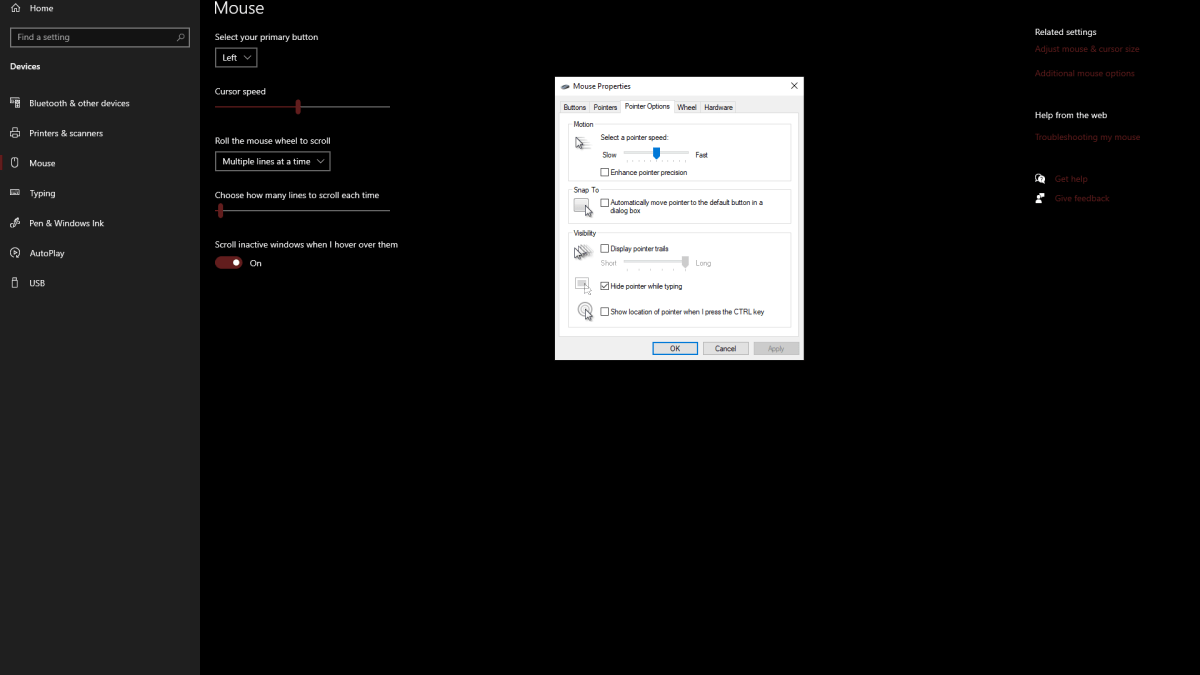
  1. Dans la barre de recherche Windows, tapez « Souris » et sélectionnez « Paramètres de la souris ».
  2. Cliquez sur « Options de souris supplémentaires » dans le coin supérieur droit.
  3. Allez dans l'onglet « Options du pointeur » et décochez « Améliorer la précision du pointeur ».
  4. Cliquez sur « Appliquer » puis sur « OK ».

Vous avez maintenant désactivé l'accélération de la souris dans le jeu et dans Windows. Une sensibilité constante améliore la visée en développant la mémoire musculaire, vous donnant un avantage significatif dans Marvel Rivals.
A screenshot of Marvel Rivals Settings demonstrating how to turn off mouse acceleration

screenshot of Mouse settings in Windows

Comprendre l'accélération de la souris et pourquoi c'est problématique

L'accélération de la souris modifie votre sensibilité en fonction de la vitesse de déplacement de la souris. Les mouvements rapides entraînent une sensibilité plus élevée, tandis que les mouvements lents la diminuent. Bien que pratique pour un usage général, cette incohérence est préjudiciable dans les jeux de tir comme Marvel Rivals.

Une sensibilité constante est cruciale pour développer la mémoire musculaire et améliorer la précision. L'accélération de la souris empêche cela en modifiant constamment votre sensibilité.

Marvel Rivals est désormais disponible sur PS5, PC et Xbox Series X|S.

Derniers articles

Plus
It looks like you're referencing a fictional or speculative "8 Ball Pool x Crossover Event Launch" — possibly inspired by the popular mobile game 8 Ball Pool by Miniclip, and a crossover with another franchise (like Fortnite, Minecraft, Genshin Impact, or even a TV show/meme). However, as of now (2024), there is no official crossover event between 8 Ball Pool and any other major franchise, including one involving an "8 Ball Pool Crossover Event Launch." Here’s what you might be thinking: 🔹 8 Ball Pool (by Miniclip) A free-to-play multiplayer pool game available on mobile and PC. Known for its fun, arcade-style gameplay, customizable avatars, and in-game tournaments. Has had limited-time events (e.g., "Pool Masters," "Duel Mode," "Crazy 8 Tournament"), but no official crossover with other IPs. 🔹 Possible Crossover Ideas (Fan Theories/Concepts) If this were a fan-made event or a rumored concept, it might involve: 8 Ball Pool x Fortnite: A skins pack featuring 8 Ball Pool avatars in Fortnite’s creative modes or in-game events. 8 Ball Pool x Minecraft: A "Pool Island" server with custom pool tables and minigames. 8 Ball Pool x Anime/Memes: Themed events like "Dragon Ball 8-Ball Mode" or "SpongeBob Pool Battle" (popular among fans). 🔹 Could This Be a Meme or Misinterpretation? Yes — "8 Ball Pool Crossover Event Launches" sounds like a viral meme, fan art title, or mock-up post from social media (like TikTok, Twitter/X, or Instagram), where users imagine wild crossovers. For example: “8 Ball Pool x Transformers: The Crossover Event Is LIVE! 🤯 #8BallPoolX” That’s likely not real — but it’s a fun idea! ✅ Final Answer: No, there is no official "8 Ball Pool Crossover Event Launch" as of 2024. It may be a fan-made concept, meme, or hoax. Miniclip has not announced any crossover with other franchises. If you saw this online, it's likely satirical content, fan art, or a hypothetical event — not a real game update. Let me know if you’d like help imagining what a real 8 Ball Pool x [your favorite game] crossover could look like! 🎱💥 En lisant
As of now, there is no official confirmation from Capcom that Lost Planet 2 has had its online co-op mode removed or "cut" in a recent update. However, it's worth noting that Lost Planet 2, originally released in 2010 for Xbox 360 and PlayStation 3, was developed with an online multiplayer co-op mode that allowed up to four players to team up against AI-controlled enemies and bosses. Over time, as online infrastructure aged and player bases dwindled, many multiplayer components of older games were phased out or discontinued—especially on platforms that are no longer actively supported. In the case of Lost Planet 2, the original online servers for multiplayer modes (including co-op) were shut down around 2016–2017, primarily due to server maintenance and declining player interest. In 2017, Capcom released a remastered version of Lost Planet 2 for PlayStation 4 and Xbox One, but this version did not include the original online co-op features. The remaster retained the single-player campaign and some local multiplayer, but the original online multiplayer and co-op functionality were not restored. So, while Capcom didn't "cut" the co-op feature in a recent update, it's accurate to say that the online co-op mode for Lost Planet 2 is no longer functional due to the shutdown of official servers and the lack of inclusion in the remastered release. Players interested in co-op experiences might want to explore other titles in the Lost Planet series, such as Lost Planet 3, which had more robust multiplayer and was released with online support, though that too eventually saw its servers shut down. In short: The online co-op for Lost Planet 2 is effectively gone—not by a recent "cut," but due to server shutdowns and lack of support in later releases. En lisant