ニュース 「Call of Duty:Black Ops 6:粒子の粗いビジュアルへの対処」

「Call of Duty:Black Ops 6:粒子の粗いビジュアルへの対処」

著者 : Alexis アップデート : Apr 16,2025

*Call of Duty *のようなプレミアムAAAゲームをプレイするとき、ファンは一流のパフォーマンスを期待しています。ただし、 * black ops 6 *グラフィックが粒子が粗くぼやけているように見え、没入感に影響を与え、ターゲットを見つけるのが難しくなる場合、視覚体験を向上させる方法は次のとおりです。

目次

なぜBlack Ops 6は粒状でぼやけているように見えるのですか? Call of Dutyでぼやけをオフにする方法:Black Ops 6穀物を減らし、ブラックOpsの透明度を改善する方法6ブラックOps 6画像の詳細とテクスチャ

なぜBlack Ops 6は粒状でぼやけているように見えるのですか?答えた

Black Ops 6は、モニターが処理できる最高の解像度にハードウェアの設定を調整した後でも、セットアップで粒子が粗く、ぼやけているように見える場合、ゲームの設定は犯人かもしれません。更新がこれらの設定をデフォルトにリセットできる場合があるため、表示、品質、ビュータブのグラフィック設定を確認する価値があります。特に、品質のタブには、 Black Ops 6の外観が大幅に改善できる重要な設定が含まれています。

Call of Dutyでぼやけをオフにする方法:Black Ops 6
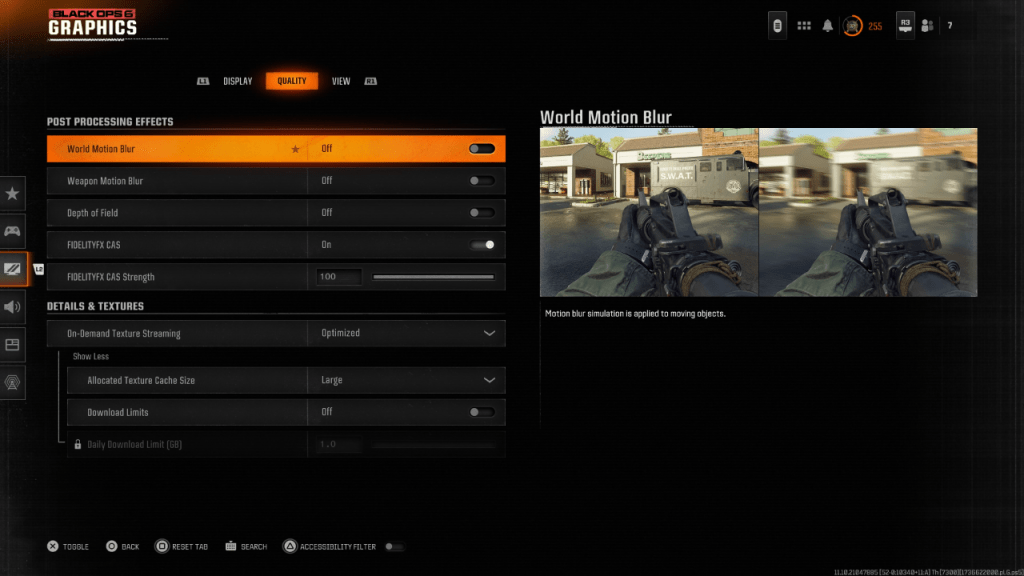
Black Ops 6を含む多くのゲームは、モーションブラーとフィールドの深さを使用して映画のような感触を高め、カメラレンズを通して見られる効果を模倣しています。これらは物語主導のゲームの没入感を増やすことができますが、 Call of Duty:Black Ops 6のような速いペースの競争力のあるタイトルに不要なぼやけを導入することができます。

これらの効果を無効にするには、グラフィック設定に移動し、[Quality]タブに移動して、ポストプロセッシング効果セクションを見つけます。ここで、スイッチ:

  • ワールドモーションはオフにぼやけています
  • 武器の動きがぼやけています
  • フィールドの深さからオフ

穀物を減らし、ブラックオプス6の明快さを改善する方法

ぼかしをオフにした後でも、画質の問題に気付くかもしれません。これは、ガンマと輝度の設定が誤っていないためかもしれません。 Black Ops 6グラフィックス設定の[表示]タブに移動し、センターパネルのCall of Dutyロゴがほとんど表示されないまで、ガンマ/Brightnessスライダーを調整します。多くの場合、50の設定はうまく機能しますが、特定のディスプレイに基づいて微調整する必要がある場合があります。

次に、[品質]タブで、FidelityFX CASがオンになっていることを確認します。これにより、AMDのFidelityFX Contrast Adaptive Sharpeningがアクティブになり、 Black Ops 6のレンダリングされたシーンがシャープになります。 50/100の強度をお勧めしますが、必要に応じてよりシャープなビジュアルのために100に増やすことができます。これらの調整が問題を解決しない場合、問題はオンデマンドテクスチャストリーミングに関連している可能性があります。

ブラックops 6の画像の詳細とテクスチャを改善する方法
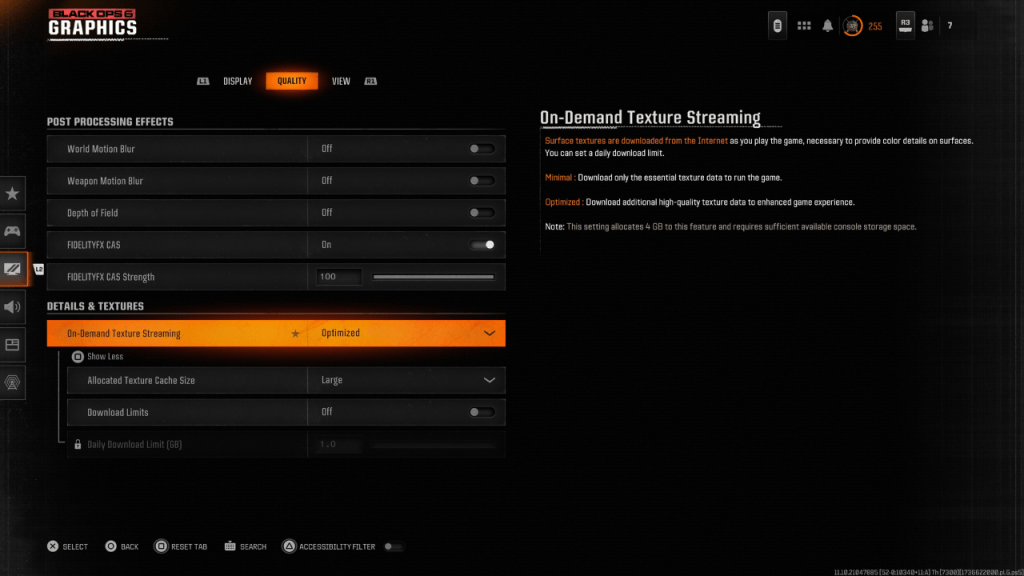
最新のCall of Dutyゲームの大きなファイルサイズを管理するために、 Black Ops 6はオンデマンドテクスチャストリーミングを使用します。これは、ローカルに保存するのではなく、再生中にテクスチャをダウンロードします。これによりスペースが節約されますが、画質を損なう可能性があります。

この機能を最適化するには、最適なグラフィックスのために、[品質]タブの下の詳細とテクスチャの設定に移動します。オンデマンドテクスチャストリーミングを設定して、高品質のテクスチャをダウンロードするように最適化します。 [その他の表示]をクリックし、割り当てられたテクスチャキャッシュサイズを大規模に調整します。これにより、より多くのシステムストレージを使用しますが、より多くのテクスチャを同時にダウンロードできます。インターネットプランが許可されている場合は、スイッチ制限をオフに切り替えて、ブラックOps 6がピークグラフィカルパフォーマンスに必要な限り多くの高解像度テクスチャにアクセスできるようにします。

これらの手順に従うことにより、 Call of Duty:Black Ops 6の視覚的な明快さと詳細を大幅に改善し、よりスムーズで没入感のあるゲーム体験を確保できます。

最新記事

もっと
Shadow of the Monkey King: The PS5 Patch That Shakes the System – 93GB Download Warning The highly anticipated Shadow of the Monkey King—officially titled Wukong—has dropped a major performance patch for PlayStation 5, promising smoother gameplay, enhanced visuals, and improved load times. But fans are bracing for a shock: the update weighs in at a massive 93GB. What’s New in the Patch? The latest patch brings significant improvements to the game’s already impressive technical foundation: Ray Tracing Enhancements: More realistic lighting, reflections, and ambient occlusion across all key environments—from the misty peaks of the Five Elements Mountains to the fiery depths of the Underworld. Framerate Stability: Fixed stuttering issues in high-combat sequences, ensuring a buttery-smooth 60fps experience in Performance Mode. Reduced Load Times: Level transitions and fast-travel now load up to 40% faster, thanks to optimized data streaming and expanded SSD utilization. AI & NPC Improvements: Enemies react more dynamically to player actions, and non-combat NPCs now display more lifelike behaviors and dialogue variations. The 93GB Download: Why So Big? While the patch delivers on quality, the 93GB size has sparked mixed reactions online. According to a dev note from Game Science: “This update includes over 100GB of new assets, including high-resolution textures, additional animation cycles, and expanded audio libraries. The bulk of the data is dedicated to preserving the game's artistic integrity and enabling future mod support through a new asset streaming framework.” Some users have pointed out that the base game is only ~40GB, meaning the patch nearly doubles the total storage requirement. What Should Players Do? Ensure You Have 100GB+ Free Space: The PS5 needs at least 100GB of free space for the full patch installation, including temporary files. Consider Using a Fast SSD: The patch’s large size and high-speed data transfer mean a fast external SSD or internal NVMe drive is recommended for optimal download and installation times. Download During Off-Peak Hours: With many players updating simultaneously, expect slower speeds during peak times. Fan Reactions The community is split: “93GB for a game that already looked gorgeous? I’ll take the upgrade.” – @PS5GamerPro “I’m not mad… I’m just disappointed my 500GB PS5 now has 100GB of ‘just for one game’.” – @GamingWithGrit “It’s worth it for the ray-traced rain in the Jade Emperor’s palace.” – @MonkeyKingFanatic Final Thoughts While the 93GB download is a hefty ask, the performance and visual gains make it a worthwhile investment for fans of Wukong. As one Reddit user put it: “It’s not a patch. It’s a revelation. Just… maybe start downloading on a weekend.” So, if you're ready to dive back into the mythic journey of Sun Wukong, grab your staff, clear some storage, and prepare for a transformation—both on screen and on your PS5’s hard drive. 🔥 Wukong has risen. But so has your download bar. 読む