ニュース ディズニーソリティア:MACゲームプレイのための究極ガイド

ディズニーソリティア:MACゲームプレイのための究極ガイド

著者 : Skylar アップデート : Aug 05,2025

ディズニーソリティアは、クラシックなソリティアのゲームプレイを魅力的なディズニーの世界と融合させています。美しいビジュアル、心地よい音楽、愛されるキャラクターが特徴で、楽しいカードゲーム体験を提供します。より大きな画面と強化されたコントロールを求める方には、MACでディズニーソリティアをプレイするのが理想的です。MAC向けの軽量なAndroidアプリプラットフォームであるBlueStacks Airは、ゲームをスムーズに楽しむためのシームレスな方法を提供します。このガイドでは、MACでディズニーソリティアを設定し、没入感のある最適化されたゲーム体験を実現する方法を詳しく説明します。

ディズニーの魔法の魅力でソリティアを体験!

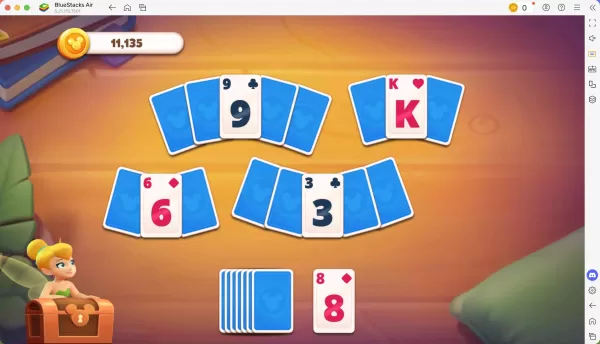
MACでディズニーソリティアをプレイすると、キーボードとマウスのコントロールの利点が得られます。これにより、正確な操作が可能になり、カードをめくる作業が簡単になります。MacBookでのプレイテストでは、ゲームはシンプルで持ち運びが簡単で、旅行中や電車内、または自宅でのカジュアルなプレイに最適でした。MACの鮮やかな4K Retinaディスプレイは、ゲームのリラックスした魅力的な要素を高め、すべての瞬間を視覚的に壮大なものにします。
ブログ画像-(ディズニーソリティア_記事_MACでプレイ_EN2)

精密なコントロールで進化!

各レベルをクリアするとスターを獲得し、ゲームのストーリーを豊かにする新しいカットシーンやキャラクターがアンロックされます。MACでは、BlueStacks Airを使用することで、さまざまなアクションにカスタマイズされたコントロールが可能です。ディズニーソリティアには、MacのキーボードコマンドSHIFT + TABでアクセス可能なプリセットコントロールが付属しています。デフォルトに満足できない場合?独自のコントロールスキームをカスタマイズし、ユニークなキー割り当てを設定してゲームプレイを効率化できます。

BlueStacks Airでディズニーソリティアを設定する方法

MACでディズニーソリティアを始めるための手順は以下の通りです:

  1. BlueStacks Airをダウンロード:ゲームのページにアクセスし、「MACでディズニーソリティアをプレイ」ボタンをクリックしてインストーラーをダウンロードします。
  2. BlueStacks Airをインストール:BlueStacksInstaller.pkgファイルをダブルクリックし、セットアップウィザードに従います。
  3. 起動してサインイン:LaunchpadまたはApplicationsフォルダからBlueStacks Airを開き、GoogleアカウントでサインインしてPlay Storeにアクセスします。
  4. ディズニーソリティアをインストール:Play Storeでディズニーソリティアを検索してインストールします。
  5. プレイ開始!アプリを起動し、ディズニーのマルチバースを通じた懐かしい旅に飛び込みましょう。

最新記事

もっと
Shadow of the Monkey King: The PS5 Patch That Shakes the System – 93GB Download Warning The highly anticipated Shadow of the Monkey King—officially titled Wukong—has dropped a major performance patch for PlayStation 5, promising smoother gameplay, enhanced visuals, and improved load times. But fans are bracing for a shock: the update weighs in at a massive 93GB. What’s New in the Patch? The latest patch brings significant improvements to the game’s already impressive technical foundation: Ray Tracing Enhancements: More realistic lighting, reflections, and ambient occlusion across all key environments—from the misty peaks of the Five Elements Mountains to the fiery depths of the Underworld. Framerate Stability: Fixed stuttering issues in high-combat sequences, ensuring a buttery-smooth 60fps experience in Performance Mode. Reduced Load Times: Level transitions and fast-travel now load up to 40% faster, thanks to optimized data streaming and expanded SSD utilization. AI & NPC Improvements: Enemies react more dynamically to player actions, and non-combat NPCs now display more lifelike behaviors and dialogue variations. The 93GB Download: Why So Big? While the patch delivers on quality, the 93GB size has sparked mixed reactions online. According to a dev note from Game Science: “This update includes over 100GB of new assets, including high-resolution textures, additional animation cycles, and expanded audio libraries. The bulk of the data is dedicated to preserving the game's artistic integrity and enabling future mod support through a new asset streaming framework.” Some users have pointed out that the base game is only ~40GB, meaning the patch nearly doubles the total storage requirement. What Should Players Do? Ensure You Have 100GB+ Free Space: The PS5 needs at least 100GB of free space for the full patch installation, including temporary files. Consider Using a Fast SSD: The patch’s large size and high-speed data transfer mean a fast external SSD or internal NVMe drive is recommended for optimal download and installation times. Download During Off-Peak Hours: With many players updating simultaneously, expect slower speeds during peak times. Fan Reactions The community is split: “93GB for a game that already looked gorgeous? I’ll take the upgrade.” – @PS5GamerPro “I’m not mad… I’m just disappointed my 500GB PS5 now has 100GB of ‘just for one game’.” – @GamingWithGrit “It’s worth it for the ray-traced rain in the Jade Emperor’s palace.” – @MonkeyKingFanatic Final Thoughts While the 93GB download is a hefty ask, the performance and visual gains make it a worthwhile investment for fans of Wukong. As one Reddit user put it: “It’s not a patch. It’s a revelation. Just… maybe start downloading on a weekend.” So, if you're ready to dive back into the mythic journey of Sun Wukong, grab your staff, clear some storage, and prepare for a transformation—both on screen and on your PS5’s hard drive. 🔥 Wukong has risen. But so has your download bar. 読む