ニュース Fortnite第6章最高のPC設定とFPSを高める方法

Fortnite第6章最高のPC設定とFPSを高める方法

著者 : Anthony アップデート : Mar 01,2025

PEAKパフォーマンスのためにFortnite PC設定を最適化します

Fortniteの要求の厳しい性質は、フレームレートがイライラすることにつながる可能性があります。ただし、ゲーム内の設定を最適化すると、パフォーマンスが劇的に向上する可能性があります。このガイドは、よりスムーズで競争力のあるFortnite体験に最適なPC設定について詳しく説明しています。

表示設定:
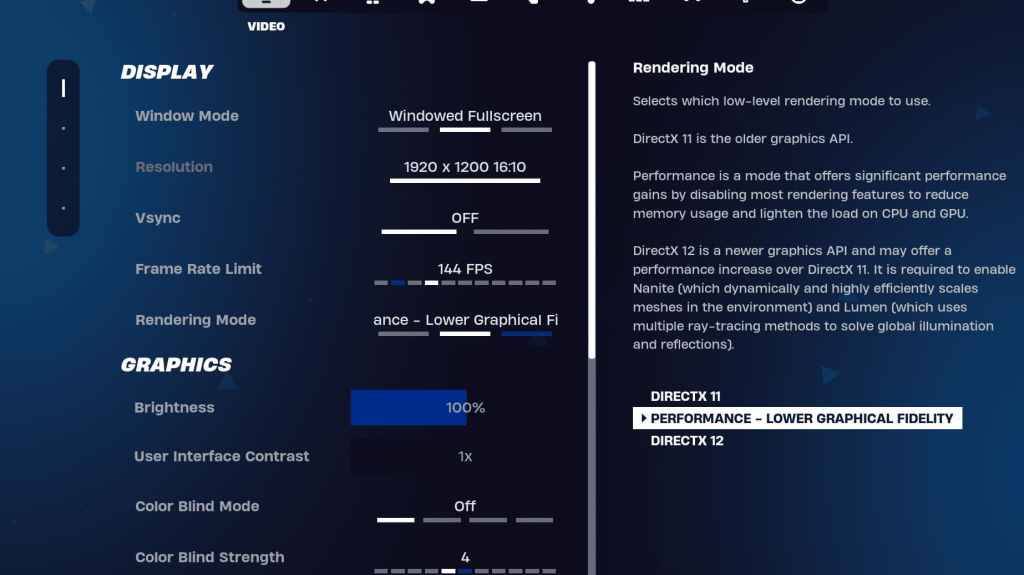
Fortnite Display Settings

ディスプレイセクションはパフォーマンスに大きく影響します。推奨される構成は次のとおりです。

SettingRecommended
Window ModeFullscreen (best performance); Windowed Fullscreen (for frequent alt-tabbing)
ResolutionNative monitor resolution (e.g., 1920x1080). Reduce for lower-end PCs.
V-syncOff (prevents input lag)
Framerate LimitMonitor refresh rate (e.g., 144Hz, 240Hz)
Rendering ModePerformance (highest FPS)

説明されたレンダリングモード:

Fortniteは、パフォーマンス、DirectX 11、およびDirectx12。Directx11の3つのレンダリングモードを提供し、DirectX 12は新しいハードウェアで潜在的なパフォーマンスの向上を提供します。最大のFPSと最小ラグの場合、「パフォーマンス」モードはプロのプレーヤーの間で好ましい選択です。

グラフィック設定:
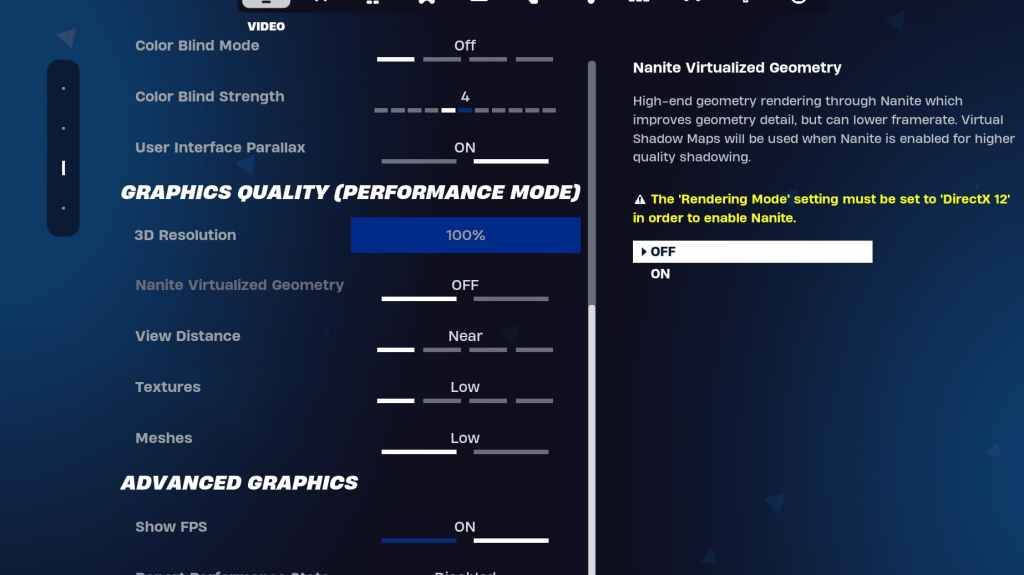
Fortnite Graphics Settings

グラフィック設定は、視覚の品質とパフォーマンスに直接影響します。より良いフレームレートのために、より低いリソースの使用量を優先します:

SettingRecommended
Quality PresetLow
Anti-Aliasing & Super ResolutionOff/Low
3D Resolution100% (70-80% for low-end PCs)
Nanite Virtual Geometry (DX12)Off
ShadowsOff
Global IlluminationOff
ReflectionsOff
View DistanceEpic
TexturesLow
EffectsLow
Post ProcessingLow
Hardware Ray TracingOff
Nvidia Low Latency ModeOn + Boost (Nvidia GPUs only)
Show FPSOn

ゲーム設定:

Fortnite Game Settings

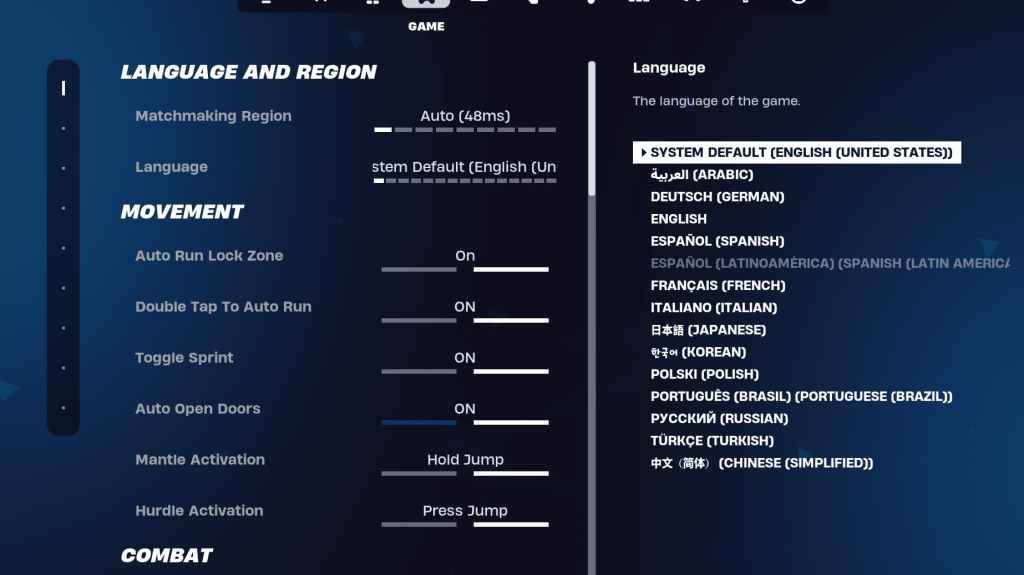
ゲーム設定はFPSに影響を与えませんが、ゲームプレイにとって重要です。これらを好みに合わせてカスタマイズしますが、以下を検討してください。

  • ムーブメント:オートオープンドア:オン;ダブルタップして自動実行:on(コントローラー)
  • 戦闘:スワップピックアップ:オン;トグルターゲティング:個人的な好み。オートピックアップ武器:オン
  • 建物:ビルディングの選択肢をリセット:オフ;編集前のオプションを無効にする:off;ターボビルディング:オフ; Auto-Confirm編集:個人的な好み。簡単な編集:個人的な好み。タップして簡単な編集:on(簡単な編集がオンの場合)

オーディオ設定:
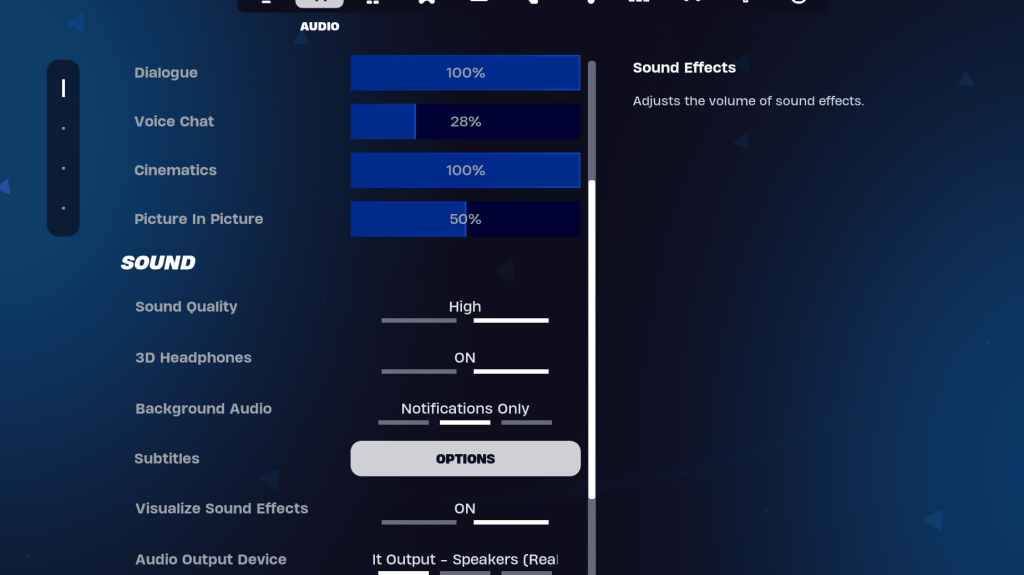
Fortnite Audio Settings

Fortniteでは良いオーディオが不可欠です。 3Dヘッドフォン(互換性の実験)を有効にし、サウンドエフェクトを視覚化して、空間認識を高めます。

キーボードとマウスの設定:
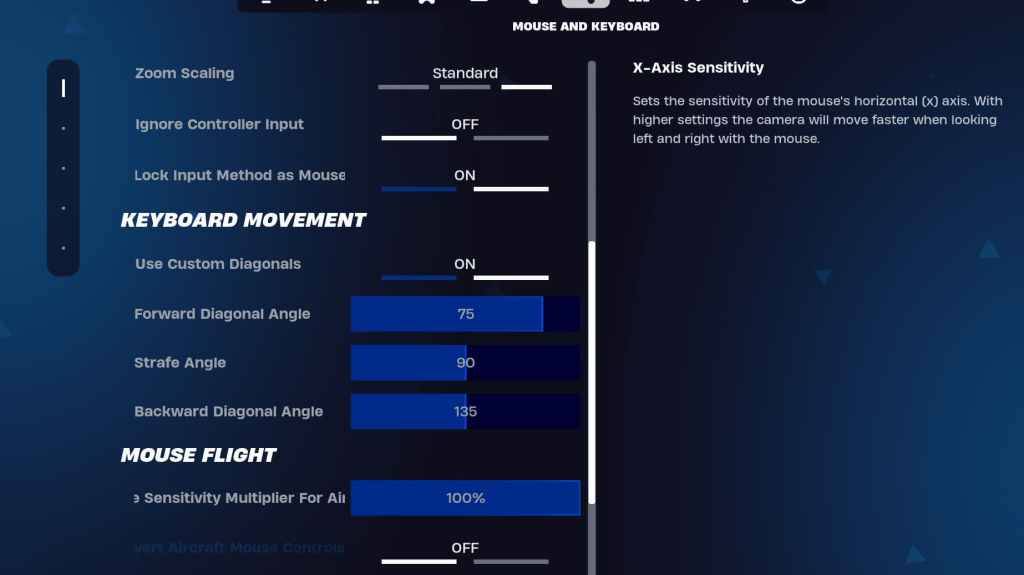
Fortnite Keyboard Settings

キーボードとマウスとキーボードコントロールタブで感度とキービンドを構成します。 X/Yの感度を調整し、感度(45-60%)、スコープ感度(45-60%)、および好みに対する感度の構築/編集を調整します。動きを改善するために、調整された角度を使用してカスタム対角線を使用することを検討してください。 Keybindsは主に個人的な好みです。

これらの設定を実装することにより、Fortniteのゲームプレイエクスペリエンスを大幅に向上させることができます。最適な設定は、特定のハードウェアによってわずかに異なる場合があることを忘れないでください。視覚的な忠実度とパフォーマンスの完璧なバランスを見つけるための実験。 Fortniteは、Meta Quest 2および3を含むさまざまなプラットフォームで利用できます。

最新記事

もっと
Shadow of the Monkey King: The PS5 Patch That Shakes the System – 93GB Download Warning The highly anticipated Shadow of the Monkey King—officially titled Wukong—has dropped a major performance patch for PlayStation 5, promising smoother gameplay, enhanced visuals, and improved load times. But fans are bracing for a shock: the update weighs in at a massive 93GB. What’s New in the Patch? The latest patch brings significant improvements to the game’s already impressive technical foundation: Ray Tracing Enhancements: More realistic lighting, reflections, and ambient occlusion across all key environments—from the misty peaks of the Five Elements Mountains to the fiery depths of the Underworld. Framerate Stability: Fixed stuttering issues in high-combat sequences, ensuring a buttery-smooth 60fps experience in Performance Mode. Reduced Load Times: Level transitions and fast-travel now load up to 40% faster, thanks to optimized data streaming and expanded SSD utilization. AI & NPC Improvements: Enemies react more dynamically to player actions, and non-combat NPCs now display more lifelike behaviors and dialogue variations. The 93GB Download: Why So Big? While the patch delivers on quality, the 93GB size has sparked mixed reactions online. According to a dev note from Game Science: “This update includes over 100GB of new assets, including high-resolution textures, additional animation cycles, and expanded audio libraries. The bulk of the data is dedicated to preserving the game's artistic integrity and enabling future mod support through a new asset streaming framework.” Some users have pointed out that the base game is only ~40GB, meaning the patch nearly doubles the total storage requirement. What Should Players Do? Ensure You Have 100GB+ Free Space: The PS5 needs at least 100GB of free space for the full patch installation, including temporary files. Consider Using a Fast SSD: The patch’s large size and high-speed data transfer mean a fast external SSD or internal NVMe drive is recommended for optimal download and installation times. Download During Off-Peak Hours: With many players updating simultaneously, expect slower speeds during peak times. Fan Reactions The community is split: “93GB for a game that already looked gorgeous? I’ll take the upgrade.” – @PS5GamerPro “I’m not mad… I’m just disappointed my 500GB PS5 now has 100GB of ‘just for one game’.” – @GamingWithGrit “It’s worth it for the ray-traced rain in the Jade Emperor’s palace.” – @MonkeyKingFanatic Final Thoughts While the 93GB download is a hefty ask, the performance and visual gains make it a worthwhile investment for fans of Wukong. As one Reddit user put it: “It’s not a patch. It’s a revelation. Just… maybe start downloading on a weekend.” So, if you're ready to dive back into the mythic journey of Sun Wukong, grab your staff, clear some storage, and prepare for a transformation—both on screen and on your PS5’s hard drive. 🔥 Wukong has risen. But so has your download bar. 読む