Fragpunkベスト設定とクロスウェアコード
多くのゲームが最適化の問題で発売され、後でパッチが適用されました。 *Fragpunk*は、リリース以来スムーズなパフォーマンスを享受してきましたが、さらにフレームレートの改善が可能です。最適なゲームプレイのための最高の * fragpunk *設定とクロスウェアコードのガイドを次に示します。
推奨されるビデオフラグパンク設定の概要
---------------------------------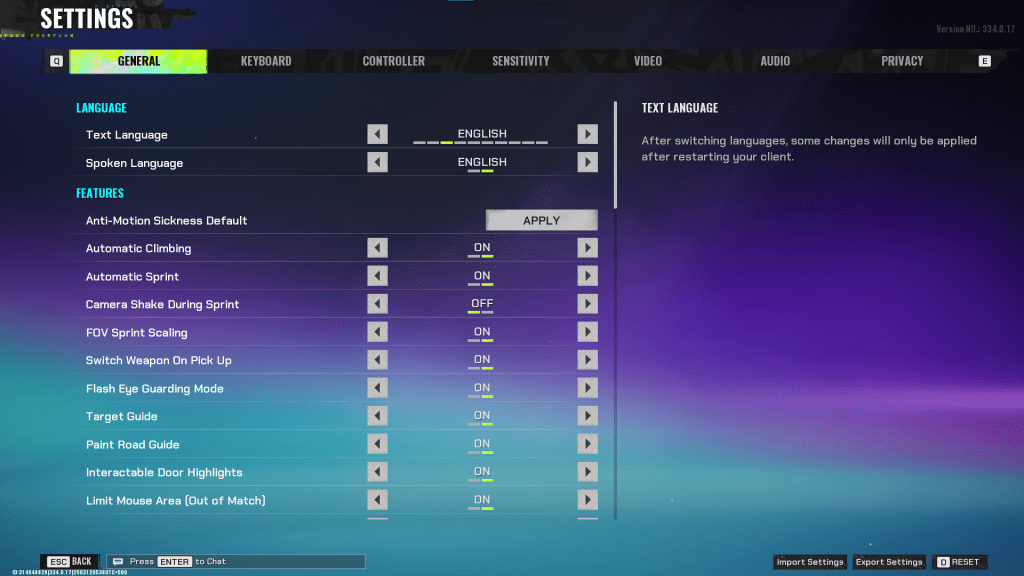
*fragpunk*の設定は、5つのタブに分かれています。ビデオタブを超えて、ほとんどはパフォーマンスの影響を最小限に抑えた生活やアクセシビリティオプションですが、ゲームプレイを強化するものもあります。それらを強調します。その他は、デフォルトのまままたは個人的な好みに合わせて調整することができます。
一般的な
一般的なタブは、主に生活の質と個人的な好みの設定を提供します。自分に最適なものを見つけるために実験してください。これらは推奨される変更ですが、いくつかの好みが関与したままです。
- 自動クライミング - オン
- 自動スプリント - オン
- スプリント中のカメラシェーク - オフ
- FOVスプリントスケーリング - オン
- フラッシュアイガード - オン
- プレーヤーを中心に保ちます - オン
- ミニマップ方向が回転します - オン
- パフォーマンスメトリック - オン
- ping可視性 - 1
- 敵から目に見える肌の成分を上に隠します
キーボード/コントローラー
ここでキーバインディングをカスタマイズします。最も注目すべき提案:自動スプリントが有効になっているため、ウォーキングをシフトに再構築し、 *valorant *や *cs2 *などの一般的なタックシューターレイアウトをミラーリングします。
感度
ここでは個人的な好みが最高でした。オンライン計算機を実験または使用して、[Valorant *や *CS2 *などのゲームから設定を変換します。
オーディオ
サウンドエフェクトを快適なレベルに調整します。音楽、アナウンサー、ボタンのボリュームを低くします。不必要な冗談を削除するために、文字音声の単純化を有効にします。
音声チャット設定は純粋に個人的な好みです。
関連:フラグパンクコード(2025年3月)
Fragpunk最高のビデオ設定
---------------------------------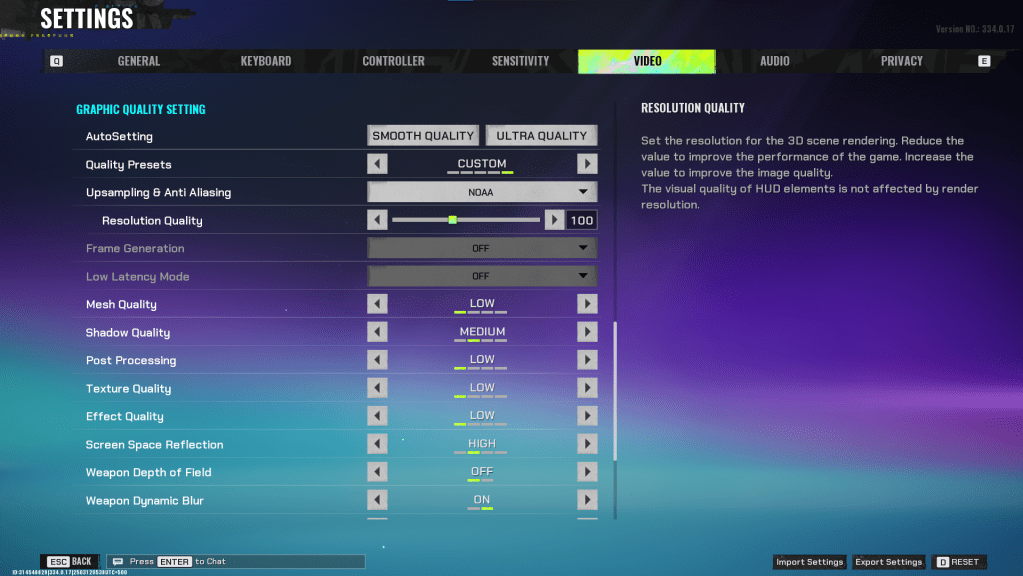
ビデオタブはパフォーマンスに大きく影響します。これらの設定は、視覚的な忠実度よりもパフォーマンスを優先します。 * fragpunk*は競争力があります。フレームは重要です。ハイエンドPCは高品質に耐える可能性がありますが、ほとんどの場合、これらはパフォーマンスに最適です。
画面
| 画面を表示します | お好みのモニター |
| 表示モード | 全画面表示 |
| 表示比 | モニターのデフォルト |
| 表示解像度 | モニターのネイティブ |
| fov | 125 |
| フィルター | デフォルトまたは個人の好み |
| 後処理強度 | なしまたは低い |
| メニューフレームレート制限 | 60 |
| ゲームプレイフレームレート制限 | モニターのリフレッシュレート |
| フォーカスのフレームレート制限 | 60 |
| 輝度 | 1または好みに応じて調整します |
| シャープ | 明るさと同じ |
| 垂直同期 | オフ |
| アンチテアリング | オフ |
| グラフィックスパイ | DX11と12を試して、システムで最適なものを確認してください |
ミニマルなグラフィックス
このユニークなオプションは、視覚効果を最小限に抑え、15〜20 fpsのゲイン(テストに基づいて)を生成しますが、視覚的な格下げが顕著です。ビジュアルよりもフレームに優先順位を付ける場合は、これらの設定で有効にすることを検討してください。
| 物質的な複雑さ | ミニマリズム |
| 軽い複雑さ | ミニマリズム |
| シーンの飽和 | ミニマリズム |
| 複雑さに影響します | ミニマリズム |
| 死んだ効果 | オフ |
| 損傷数 | の上 |
| UI情報の簡素化 | の上 |
| UIアニメーションの簡素化 | オフ |
グラフィックの品質設定
| 高品質のプリセット | カスタム |
| アップスケーリングとアンチアリアシング | GPUに応じて、AMD GPUのパフォーマンスを使用してFSR 2を選択するか、NVIDIA GPUのパフォーマンスを使用してNVIDIA画像スケーリングを選択します。アップスケーリングを使用したくない場合は、100%でNOAAに設定することもできます。 |
| メッシュ品質 | 低い |
| 影の品質 | 中くらい |
| 後処理 | 低い |
| テクスチャ品質 | 低い |
| 効果のある品質 | 低い |
| スクリーンスペースの反射 | 高い |
| 武器の深さ | オフ |
| 武器のダイナミックブラー | の上 |
| シーンのダイナミックブラー | オフ |
| レイトレース | オフ |
| SSGI | の上 |
| UI解像度 | 高い。ゲーム内FPSには影響しません。 |
| アニメーション物理 | オフ |
Fragpunk最高の十字線コード
------------------------------------よく作られた十字線は、 * fragpunk *ゲームプレイを強化します。試してみるためのいくつかのオプションがあります。
クラシックプラス
azazafzaezaezaezaezfczazaabzaafzazaaabzazaczaczaczaczfcbzbzaabzaafzazaaabzFFFFFFzFFFFFFクラシックドット
czazafzaezagzagzagzfczbzaabziedzazaaabzazaczaczaczaczfcbzbzaabzaafzazaaabzFFFFFFzFFFFFF精密プラス
azazafzaezaezaezaezabzazaabziedzazaaabzazaczaczaczaczfcbzbzaabzaafzazaaabzFFFFFFzFFFFFF古典的なT形
bzazafzaezaezaezaezabzbzaabziedzazaaabzazaczaczaczaczfcbzbzaabzaafzazaaabzFFFFFFzFFFFFこれらは、最高の * fragpunk *設定とクロスヘアコードです。 * fragpunk*は現在PCで利用可能です。
最新記事
![1xBet [Updated]](https://imgs.yx260.com/uploads/76/1719623227667f5e3be7616.jpg)