Heim Nachricht Beste Einstellungen für Marvel -Konkurrenten: Steigern Sie die Frames und reduzieren Sie die Eingangsverzögerung

Beste Einstellungen für Marvel -Konkurrenten: Steigern Sie die Frames und reduzieren Sie die Eingangsverzögerung

Autor : Charlotte Aktualisieren : Jan 25,2025

Mastering Marvel Rivals : Optimierung Ihrer Einstellungen für die Spitzenleistung

Marvel Rivals liefert aufregende Schlachten, legendäre Helden und atemberaubende Bilder. Wenn Sie jedoch gut optimiert sind, kann die Feinabstimmung Ihrer Einstellungen die Fluidität und Kontrolle der Gameplay erheblich verbessern. Diese Anleitung beschreibt die Anpassungen zur Anzeige, Grafik und Audioeinstellungen, um das Potenzial Ihrer Hardware zu maximieren und Ihren inneren Superhelden zu entfesseln.

Hinweis: Einstellungen nicht explizit erwähnt (bindend, Zugänglichkeit, sozial).

Marvel -Rivalen: Optimale Anzeigeeinstellungen
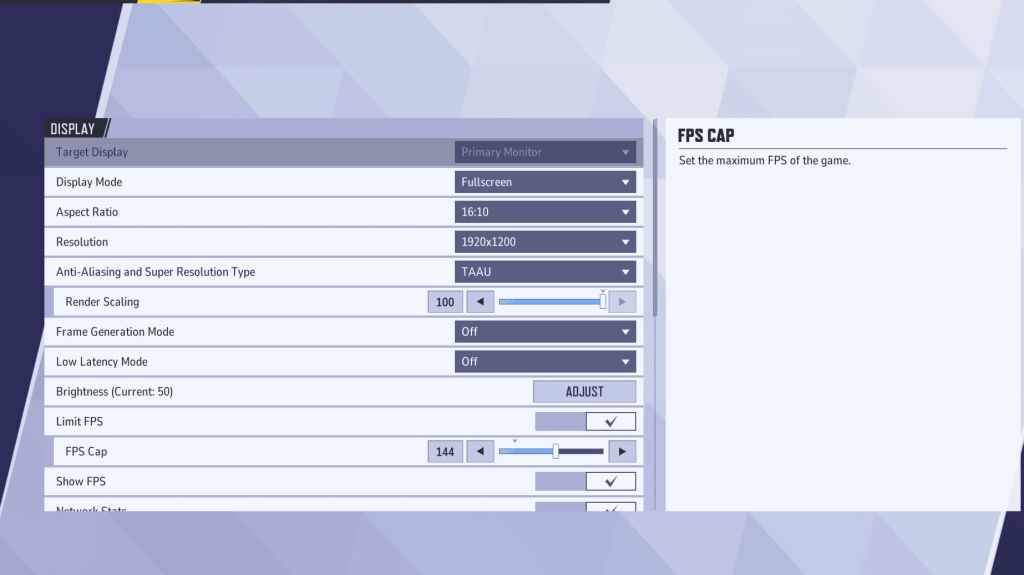
Marvel Rivals Display Settings

Beginnen Sie mit Anzeigeeinstellungen.

Vollbildmodus wird für eine optimale Leistung empfohlen, wodurch alle Systemressourcen für das Spiel widmet, FPS maximiert und Ablenkungen minimiert werden. randloser Fenstermodus bietet Multitasking -Komfort, kann jedoch die FPS leicht reduzieren und die Eingangsverzögerung einführen.

Marvel Rivals: Optimale Grafikeinstellungen
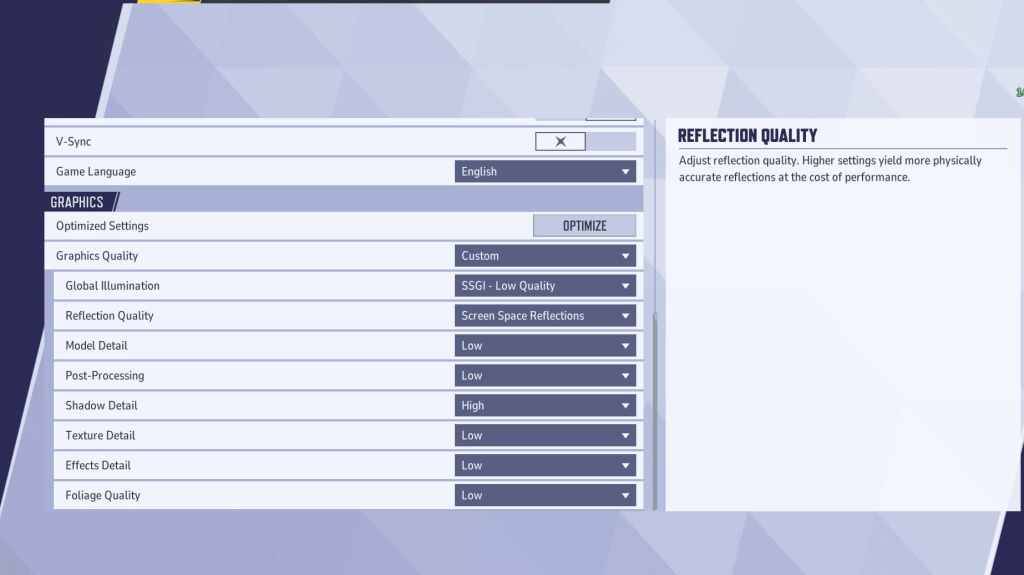
Marvel Rivals Graphics Settings

Grafikeinstellungen wirken sich stark auf die Leistung aus. Für wettbewerbsorientiertes Spielen geben Sie der Leistung Vorrang vor der visuellen Wiedergabetreue und stellen Sie die meisten Werte auf „Niedrig“ ein, um ein flüssigeres, reaktionsschnelleres Gameplay zu erzielen. High-End-PCs können mit mittleren oder hohen Einstellungen experimentieren.

Setting Description Best Setting
Graphics Quality Preset adjusting multiple visual settings. Custom
Global Illumination Simulates light bouncing; higher settings are resource-intensive. SSGI – Low Quality
Reflection Quality Clarity and realism of reflections. Screen Space Reflections
Model Detail Complexity and realism of models. Low
Post-Processing Visual effects like motion blur and depth of field. Low
Shadow Detail Sharpness and quality of shadows. High
Texture Detail Resolution of in-game textures. Low
Effects Detail Quality of visual effects. Low
Foliage Quality Density and detail of environmental elements. Low

Deaktivieren Sie die Mausbeschleunigung sowohl in den Spiel- als auch in den Windows-Einstellungen, um die Zielgenauigkeit zu verbessern.

Marvel Rivals: Optimale Audioeinstellungen
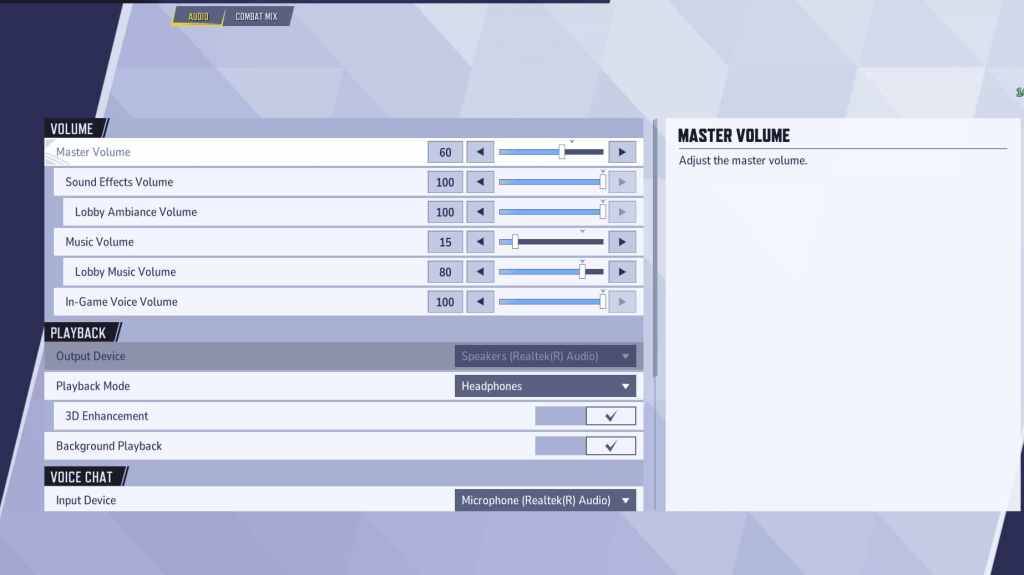
Marvel Rivals Audio Settings

Audio verbessert das Gameplay erheblich. Aktivieren Sie die 3D-Verbesserung für einen verbesserten räumlichen Klang, der die Lokalisierung des Feindes erleichtert. Verwenden Sie HRTF (falls verfügbar) für verbesserte Audiohinweise. Passen Sie die Lautstärke Ihren Wünschen an.

Weiter:Beste Teamfähigkeiten in Marvel Rivals

Neueste Artikel

Mehr
It seems you're referring to a mobile game called Figment Puzzle Game, possibly looking for information about it being free on the Epic Games Store. However, as of now, there is no widely known puzzle game titled Figment Puzzle Game available on the Epic Games Store for mobile. Here are a few clarifications: Epic Games Store Mobile Availability: The Epic Games Store is primarily available on desktop (Windows), and while it does have a mobile app for Android, it does not currently offer a large library of mobile-exclusive games like Figment Puzzle Game. Most games on the Epic Store are PC-focused. Figment – The name "Figment" may be referencing Figment, a whimsical character from Disney's Dreams (a multimedia project), or a game inspired by that character. There have been indie puzzle games with similar themes, but no major title named Figment Puzzle Game is officially listed on Epic Games Store. Free on Epic Games: If a game is free on the Epic Games Store, it’s usually highlighted as such. You can check the store directly at https://www.epicgames.com to search for "Figment" or related puzzle games. 🔍 What You Can Do: Search the Epic Games Store app (on Android or desktop) for "Figment Puzzle Game". Check if it’s a third-party indie game on platforms like Itch.io or Google Play. Confirm the game’s official name—sometimes titles are slightly different. If you meant a different game (e.g., Puzzle Quest, Monument Valley, or The Talos Principle), let me know and I can help find a free alternative on the Epic Store or other platforms. Let me know more details if you’d like help! Lektüre
As of now, there is no official confirmation from Nintendo regarding a game being removed from the Nintendo Switch due to Switch 2 compatibility delays. Reports suggesting such a removal may stem from misinformation, speculation, or confusion surrounding future hardware transitions. Nintendo has not announced any plans to remove existing games from the Nintendo Switch eShop or physical library due to delays in the upcoming Switch 2 (often referred to as the Switch successor or "Switch 2" in media). In fact, Nintendo has consistently emphasized support for its current Switch platform, including continued game releases and online services. That said, it's common for rumors to circulate when new hardware is in development—especially around backward compatibility, game availability, and potential changes to digital storefronts. However, as of the latest updates (early 2024), all major Switch titles remain accessible, and no game has been officially delisted for compatibility reasons. If you’ve seen a specific report about a game being removed, it may be a misunderstanding or a misinterpretation of a different issue—such as a temporary service outage, regional availability changes, or a game being delisted for non-technical reasons (e.g., licensing, publisher decisions). For accurate information, always refer to official Nintendo sources like Nintendo's website or their social media channels. Stay tuned—Nintendo is expected to provide more details about its next-generation console at future events like Nintendo Direct. Lektüre