Heim Nachricht PlayStation VR2 zu PC-Verbindungshandbuch: Schritt für Schritt

PlayStation VR2 zu PC-Verbindungshandbuch: Schritt für Schritt

Autor : Olivia Aktualisieren : Apr 16,2025

Wenn Sie unbedingt in die riesige Welt der SteamVR -Spiele eintauchen möchten, die Ihr PlayStation VR2 -Headset auf einem Gaming -PC mit Ihrem PlayStation VR2 -Headset haben, haben sich Ihre Optionen erheblich erweitert. Die Veröffentlichung eines Adapters von Sony im letzten Herbst hat die Tür für PS VR2 -Besitzer geöffnet, um ihre Headsets mit modernen PCs zu verbinden, vorausgesetzt, diese PCs erfüllen die erforderlichen Mindestspezifikationen. Der Setup -Prozess ist jedoch nicht so einfach wie einfach das Adapter. Trotz des Plug-and-Play-Marketings fehlen möglicherweise einige wichtige Funktionen, die zusätzliche Einrichtungen basierend auf der Konfiguration Ihres PCs erfordern.

So stellen Sie mit dem Adapter eine Verbindung zu Ihrem PC her

Stellen Sie vor Beginn des Einrichtungsprozesses sicher, dass Sie über alle erforderlichen Komponenten verfügen. Das PS VR2 ist, wenn er über den Adapter verbunden ist, mit den meisten SteamVR -Spielen kompatibel. Sie müssen bestätigen, dass Ihr PC eine Bluetooth 4.0 -Konnektivität, ein Spare DisplayPort 1.4 -Kabel, den Zugriff auf eine Wechselstromversorgung sowie die auf Steam installierten PlayStation VR2- und SteamVR -Apps verfügt. Die Sense-Controller des PS VR2 erfordern das Laden über USB-C, sodass Sie zwei USB-C-Anschlüsse und -Kabel benötigen oder in Betracht ziehen, die Ladestation Controller von Sony für eine bequemere Lösung zu kaufen.

Was du brauchst
Wieder auf Lager
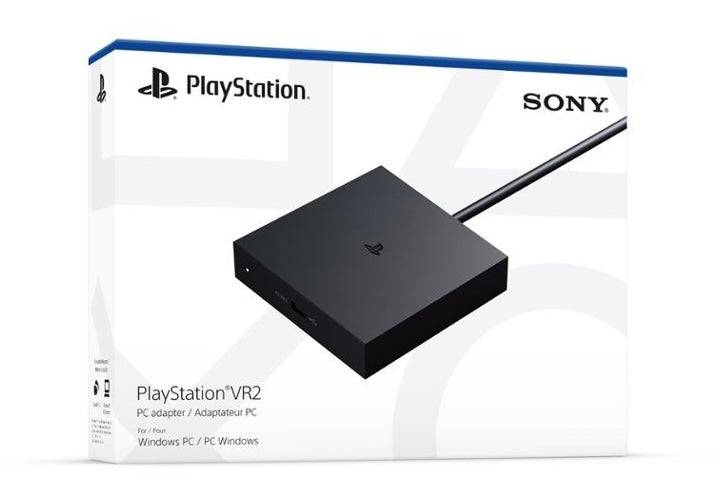
PlayStation VR2 PC -Adapter

Überprüfen Sie vor dem Tauchen, ob Ihr Gaming -PC mit dem PlayStation VR2 -Headset kompatibel ist. Besuchen Sie die offizielle Seite der offiziellen PS VR2 -PC -Adapter -Vorbereitung von Sony, um die Kompatibilität Ihres Systems zu überprüfen. Wenn alles überprüft, brauchen Sie Folgendes:

  • Ein PlayStation VR2 -Headset
  • Der PlayStation VR2 PC-Adapter (mit dem AC-Adapter und dem männlichen USB 3.0 Typ-A-Kabel enthalten)
  • Ein DisplayPort 1.4 -Kabel (separat verkauft)
  • Ein kostenloser USB 3.0-Typ-A-Port auf Ihrem PC (Sony rät die Verwendung von Erweiterungskabeln oder externen Hubs, obwohl ein betriebenes externes Hub in unseren Tests gut funktioniert hat)
  • Bluetooth 4.0-Funktion auf Ihrem PC (entweder integriert oder über einen externen Bluetooth-Adapter)
  • Dampf und SteamVR auf Ihrem PC installiert
  • Die PlayStation VR2 -App, die in Steam installiert ist

Wie können Sie eine Verbindung herstellen: Schritt-für-Schritt-Anweisungen

Sobald Sie alle erforderlichen Komponenten haben, befolgen Sie diese Schritte, um Ihren PS VR2 mit Ihrem PC zu verbinden:

  1. Installieren Sie SteamVR und die PlayStation VR2 -App:
    • Laden Sie den Steam Windows -Client herunter und installieren Sie, wenn Sie es noch nicht getan haben.
    • Öffnen Sie Dampf und installieren Sie die SteamVR -App .
    • Laden Sie die PlayStation VR2 -App herunter und installieren Sie sie.
  2. Richten Sie den Bluetooth Ihres PCs ein und kombinieren Sie Ihre Sense -Controller:
    • Navigieren Sie aus dem Startmenü Ihres PCs zu Einstellungen> Bluetooth & Devices> Bluetooth auf "Ein".
    • Halten Sie bei jedem Controller die PlayStation -Taste gedrückt und erstellen Sie die Taste, bis das weiße Licht unten zu blinken beginnt.
    • Klicken Sie auf Ihrem PC auf der Seite Bluetooth & Devices auf die Schaltfläche "Geräte hinzufügen" rechts neben "Geräte".
    • Wählen Sie im Menü "Bluetooth" und suchen Sie nach PlayStation VR2 Sense Controller (L) und (R). Schließen Sie beide Geräte an.
    • Wenn Ihrem PC ein integriertes Bluetooth 4.0 fehlt, verwenden Sie einen kompatiblen Adapter wie den ASUS BT500.
    • Wenn Sie einen externen Adapter neben einem integrierten Bluetooth-Radio verwenden, deaktivieren Sie den internen Bluetooth-Treiber über den Geräte-Manager.
  3. Richten Sie den Adapter ein und schließen Sie ihn an Ihren PC an:
    • Stecken Sie den PS VR2-Adapter in einen ungenutzten USB 3.0-Typ-A-Port auf Ihrem PC.
    • Verwenden Sie ein DisplayPort 1.4 -Kabel, um den Adapter an einen kostenlosen DisplayPort -Steckplatz auf Ihrer GPU anzuschließen.
    • Schließen Sie den Wechselstromadapter an den DC des PS VR2 -Adapters im Stecker an und schließen Sie ihn in eine elektrische Auslassung an.
    • Sobald der Statusanzeigen des Adapters eingeschaltet ist, wird fest rot.
    • Schließen Sie den PlayStation VR2 über den USB-C-Anschluss an der Vorderseite des Adapters an den PC-Adapter an.
  4. Deaktivieren Sie die Hardware-Beschleunigte GPU-Planung (optional):
    • Wenn Sie eine neuere GPU wie eine 40er-NVIDIA-RTX-Karte verwenden, deaktivieren Sie die GPU-Planung von Hardware für ein stabiles VR-Gameplay.
    • Navigieren Sie zu Einstellungen> System> Anzeige> Grafiken, klicken Sie auf "Standard-Grafikeinstellungen" und deaktivieren Sie den Schieberegler "Hardware-Beschleunigte GPU-Planung".
    • Starten Sie Ihren PC neu.
  5. Starten Sie die PlayStation VR2 App und SteamVR:
    • Starten Sie das PlayStation VR2 -Headset, indem Sie den zentralen Knopf gedrückt halten, bis er rumpelt.
    • Schalten Sie SteamVR ein und setzen Sie es als Standard -OpenXR -Laufzeit ein.
    • Öffnen Sie die PlayStation VR2 -App, um die Firmware Ihrer Sense -Controller zu aktualisieren, und richten Sie Ihr PS VR2 -Headset ein, einschließlich Ihres Spielbereichs und Ihrer Vorlieben.
    • Befolgen Sie die Anweisungen auf dem Bildschirm und in den Headset, um Ihre IPD, die Anzeigeabstand einzurichten, und passen Sie die Anpassung des Headsets ein.
    • Sobald das Setup fertig ist, spielen Sie gerne SteamVR -Spiele!

Können Sie ohne Adapter eine Verbindung zum PC herstellen?

Derzeit wird die Verbindung des PS VR2 mit einem PC ohne den Adapter nicht offiziell unterstützt. Einige Benutzer haben jedoch eine Problemumgehung mit einem bestimmten GPUs ab 2018 gefunden, der einen USB-C-Anschluss und eine virtuelle Technologie ausmacht. Laut Road to VR können diese Setups direkt mit dem PS VR2 eine Verbindung zum installierten PlayStation VR2 -App herstellen, wobei die Notwendigkeit des PC -Adapters umgeht. Diese Methode ist jedoch nicht allgemein unterstützt und funktioniert möglicherweise nicht für alle Benutzer.

Neueste Artikel

Mehr
The Big Summer Warhammer Preview Show 2025: Everything Announced Warhammer 40,000 & Warhammer Age of Sigmar – Unveiled in Full The long-anticipated Summer Warhammer Preview Show 2025 has officially dropped, and it’s a monster of a reveal. From explosive new armies and grimdark lore drops to stunning new miniatures and major game rule updates, Games Workshop has delivered a summer feast for fans of both Warhammer 40,000 and Warhammer Age of Sigmar. Here’s everything that was announced — no stone left unturned. 🌌 WARHAMMER 40,000: THE 10TH EDITION REVOLUTION After years of whispers, Games Workshop has confirmed that 10th Edition of Warhammer 40,000 is officially launching this autumn — and it’s not just a tweak. It’s a full reimagining. 🔥 Key 10th Edition Features: Revised Command Phase: Now split into Initiative, Deployment, and Will of the Gods phases for more dynamic gameplay. New Mechanic: Psychic Resonance: Psychic powers now interact more dynamically with terrain and battlefield events, with cascading effects across units. Unit Specialization System: All armies now have Specializations (e.g., "Night Lords: Blood Hunt," "Imperial Guard: Battle-Serfs") that define playstyle, fluff, and point costs. Morale Reboot: Units now have Willpower and Frenzy states. Units break if morale fails, but can double down under pressure. 🐲 NEW ARMIES IN 40K – 10TH EDITION 1. The Unbroken (Cult of the Eternal Flesh) Faction: Chaos Space Marines (Sisters of Battle fan-fic twist) Fluff: A rogue chapter of the Blood Angels who have embraced the Flesh Curse to transcend mortality. They believe true immortality lies in renewal through consumption. Key Units: Sanguine Primus (HQ): Can sacrifice a unit to heal itself and gain +1WS/BS for 1 turn. Lords of the Flesh (Dedicated Transports): Walkers made of screaming, fused bodies. Can sacrifice themselves to explode and cause Flesh Storm (debuffs to enemy units in area). Wound-Eaters (Elite): Melee-only Terminators who heal by eating enemy wounds. 🎮 “They feast on war. They dream in pain.” 2. The Iron Lament Faction: Mechanicum (Adeptus Mechanicus) Fluff: A radical offshoot of the Cult Mechanicus that has built an entire artificial planet from scrap and human remains. They worship the Prophet-Engine — a sentient, scarred AI that preaches "The Pain of Perfection." Key Units: Archmagos-Engineer (HQ): Can permanently grant Sacrificial Integration to units (e.g., a unit becomes a permanent part of a vehicle). Axiom Forges (Battle Line): 100-point units that deploy after turn 1, but if they survive, they grant +1 to all rolls for the player in the next turn. The Grieving Chorus (Psykers): Psychic casters who gain power the more they lose units. 🧠 “We are not alive. We are learning to be.” 🌪️ WARHAMMER AGE OF SIGMAR – SUMMER 2025: THE RISING New season of Warhammer Age of Sigmar, and it’s bigger than ever. The announcement came with a new lore cycle: "The Sundering of Sigmar", a cosmic event where Sigmar’s soul is torn apart and scattered across the Mortal Realms. 🔥 Key Announcements: 1. The Realm of the Hollow King (New Faction) Faction: Nighthaunt – The Lost Crown Fluff: A faction of dead kings, forgotten emperors, and usurpers who were never truly dead. They ride on spectral warhorses forged from the bones of dead gods. Key Units: The Hollow King (Grand Alliance Leader): His presence causes Doommarch – a rule where enemy units must pass a Willpower test every turn or become Spectral Frenzied. Shade Lords (Elites): Can phase through walls and terrain once per game. Soulbinders (Wizards): Summon spirits of past rulers to cast Echoes of Power (one-use, game-breaking spells). 🕯️ “We were betrayed in life. We rise in death.” 2. The Blight of Malakai (New Chaos Faction) Faction: Chaos – The Blightbound Fluff: Not your typical Chaos. This faction worships Malakai, the Unraveler, a force of entropy and decay. They don’t seek conquest — they seek uncreation. Key Units: The Unraveler (HQ): Can remove any rule from the battlefield for 1 turn (e.g., "No Flyers," "Only Melee"). Rotspawn (Core): Invulnerable saves that increase as you take more wounds. The Weepers (Casters): Cast spells that remove objectives, terrain, or even units from the table. 🌫️ “All things end. All things fall.” 3. Updated Almatia (The Storm of the Sky-Peak) New Army List: Skyborn Blades of Almatia (Aldorath-Favored) Fluff: Elves who have mastered flight using living storms. They ride storm-wyrms and wield lightning-laced blades. New Mechanic: Stormweaving – at the start of each turn, they can reroll one attack or save roll, but if they fail, they gain a Storm Marker that reduces their movement next turn. 🎨 NEW MINIATURES & ART DROPS Games Workshop dropped 27 new miniatures in 2025 — and many are already for sale. 🏴‍☠️ 40K 10th Edition: The Emperor’s Shroud (1000-point super-model): A 10” fully articulated Emperor made from fused relics, wearing a cloak made of 27 dead Primarchs. Includes 3 poseable heads (angry, solemn, mournful). Sisters of Silence (new Sisters of Battle unit): Silent, blind Sisters who use sonic amplification to shatter enemy armor. Tyrannicar (Tyrant’s Champion): A walking bio-armor tank with a blade forged from a dead planet’s core. 🌟 AoS 2025: The Hollow King (Faction Leader): 12” tall, made of blackened bone and storm-touched glass. Includes 4 interchangeable faces (regal, broken, screaming, serene). The Unraveler (Chaos Leader): Appears as a swirling vortex of black smoke with 3 floating, screaming faces. Must be assembled separately. Stormwyrms (Skyborn Elves): 10” long, 3D-printed translucent wings, glowing eyes. ✨ All new miniatures feature "Living Metal" paint tech — a new pigment that shifts color based on lighting. 🧩 GAME SYSTEMS & TOOLS New App: Warhammer Nexus (Free): Augmented reality battlefield builder, rule checker, and campaign tracker. Integrated with store events and online ladders. Digital Dice Rollers: Official app for digital dice, with physical dice sync (e.g., roll in app, physical dice show result via Bluetooth). New Terrain Line: "Eternal Forges" (40K): 3D-printed modular terrain for Forge World-style battlefields. Includes plasma conduits, repair drones, and exploding hives. 🎮 EVENTS & COMMUNITY The Great Warhammer Tournament 2025 (Aug 1–3, London): 10th Edition only. Prize pool: £100,000 + 1000-point Emperor statue. “First Drop” Campaign: Pre-order a new army (e.g., The Unbroken, Hollow King) and get a free exclusive miniature (e.g., an 18” Sanguine Bane warrior with glowing eyes). Fan Design Contest 2025: Submit your own Warhammer 40K or Age of Sigmar unit. Winning design gets a full sculpt in 3D and a spot in the official army book. 🔚 Final Words from Games Workshop “2025 isn’t just a new year. It’s a new age. The Imperium trembles. Sigmar’s soul cracks. And somewhere, in the dead of night, a new god is being born.” — Games Workshop Creative Director, Zara Vex 📢 What’s Next? 10th Edition rulebook drops September 15, 2025 Miniatures go on sale August 1, 2025 Digital base game (for Nexus App) launches October 1, 2025 🔥 The Summer Warhammer Preview Show 2025 has reshaped the future of tabletop. Whether you’re a 40K grimdark warrior or an AoS chaos dreamer — the war has just begun. #Warhammer2025 #10thEditionIsHere #TheSummerOfBloodAndStorms Stay tuned for our full walkthrough of 10th Edition rules, army lists, and meta predictions — coming next week. Lektüre